Rehandle groups (rehandle movements)
Rehandle groups allow you to model the physical rehandle of material from a stockpile to another location using actual resources like loaders or conveyors. While the Product Optimiser (PO) determines optimal flows based on blending and quality targets, these flows are virtual by default. Rehandle groups bridge this gap by linking physical resources to specific material movements, providing accurate planning and reporting.
What are rehandle groups?
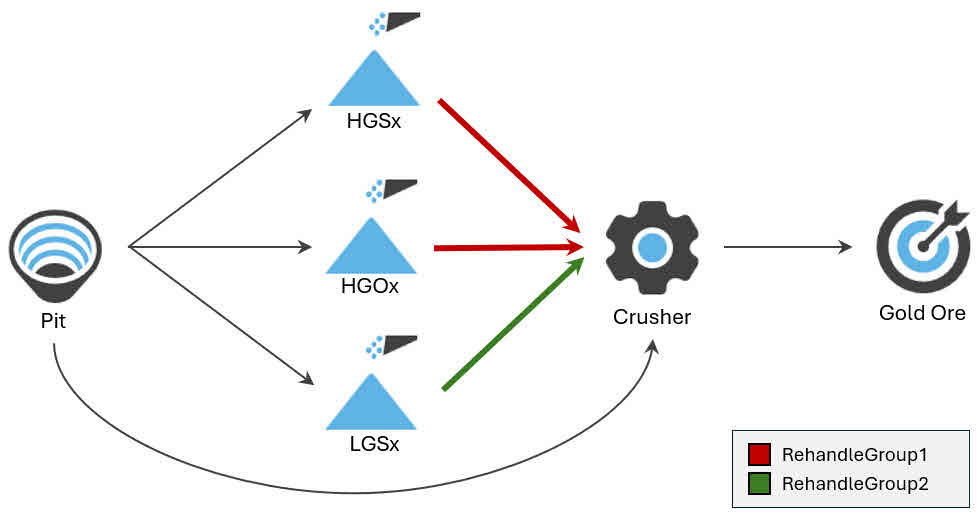
A rehandle group represents a set of material movements (arcs) between a stockpile and another intermediate or a final location (e.g., stockpile → crusher). These groups are defined in the material flow diagram and are used to associate physical resources with specific rehandling tasks.
Assign resources to rehandle groups
A resource can perform rehandling on a rehandle group’s movements. To set this up, allocate the resource to the Rehandle Operations activity. This activity is system-defined and configured in System Config > Resources.
Each rehandle resource has time usage fields (refer to Client > Resources) that define how much of the resource’s available operating time can be allocated to each rehandle group per period.
-
A resource’s total allocation across all rehandle groups must be 0% or 100% per period.
-
The schedule uses these allocations to determine how much material each resource can move per group per period.
-
Differences in available time (e.g., due to rosters or delays) affect a resource’s total available operating time.
-
Resources cannot perform in-pit and rehandle group activities in the same period, but they can switch between them across periods.
Rehandle contribution
Each resource’s contribution to a rehandle group is based on:
-
Its rehandle rate (tonnes/hour)
-
Its percentage allocation to the group
-
Its available operating hours (based on shift length, availability, and utilisation)
These values determine how much material the resource can move in a given period.
Example scenario
Rehandle groups
A site has the following rehandle groups:
|
Group |
Movements |
|---|---|
|
Group1 |
HGSx Stockpile → Crusher HGOx Stockpile → Crusher |
|
Group2 |
LGSX Stockpile → Crusher |
Resources
The site has the following resources:
|
Source |
Activities |
Rate (t/h) |
Shift/Period Length |
Total Delays |
Operating Time |
|---|---|---|---|---|---|
|
Resource1 |
Rehandle Operations |
800 t/h |
12 hours |
30 mins |
11.5 hours |
|
Resource2 |
Rehandle Operations |
800 t/h |
12 hours |
30 mins |
11.5 hours |
Resource allocation per period
The resources have the following rehandle allocation percentages (defined in Client > Resources). These allocations are the same across each period.
|
Resource |
Rehandle Group |
% Time |
Max Time |
Max Moved (t) |
|---|---|---|---|---|
|
Resource1 |
Group1 |
60% |
6h 54m |
5,520 |
|
Group2 |
40% |
4h 36m |
3,680 |
|
|
Resource2 |
Group1 |
100% |
11h 30m |
9,200 |
|
Group2 |
0% |
0h 0m |
0 |
For each resource:
-
The maximum amount of time that can be spent operating on a rehandle group is shown.
-
This is calculated by getting the % Time percentage of the resource’s available operating time (11.5 hours).
-
-
The maximum amount of moved material is also shown.
-
This is calculated by taking the available operating time and multiplying it by the resource’s hourly production rate.
-
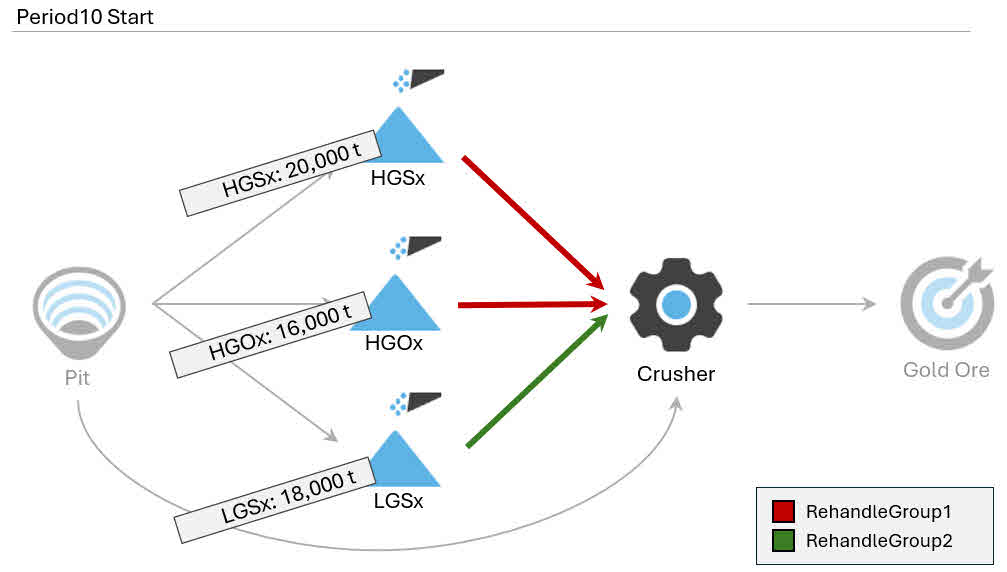
Stockpile inventories at start of period
The stockpile inventories at the start of Period 10 are shown below.
|
Stockpile |
Inventory (t) |
Rehandle Group |
|---|---|---|
|
HGSx Stockpile |
20,000 |
Group 1 |
|
HGOx Stockpile |
16,000 |
Group 1 |
|
LGSx Stockpile |
18,000 |
Group 2 |
Scheduling logic
To allocate resources, the schedule respects the resource limits (refer to Resource allocation per period above) per group:
-
Group1: Resource1 (5,520 t) + Resource2 (9,200 t) = 14,720 t (max moved per period)
-
Group2: Resource1 only = 3,680 t (max moved per period)
Example allocation
The Product Optimiser attempts to get only one resource to mine from a given stockpile at a time. Before another resource can mine from a stockpile, the other resource must exhaust its capacity on the stockpile within the period. This isn’t always possible – but it’s the likely allocation scenario.
A possible allocation plan for rehandling in Period 10, based on the logic and constraints, is shown below.
-
Resource2 rehandles all tonnes from Group1’s contribution to HGSx (8,179 t).
-
Resource2 then rehandles some of Group1’s contribution to HGOx (1,021 t).
-
The resource’s periodic capacity (800 t/h × 12hrs = 9,600 t capacity) prevents the resource from rehandling more of HGOx.
-
-
Resource1 then mines as much as it can from HGOx, following its Group1 contribution (5,520 t)
-
Resource1 then mines as much as it can from LGSx, following its Group2 contribution (3,680 t).
|
# |
Resource |
Group |
Stockpile |
Tonnes Moved |
Resource capacity |
|---|---|---|---|---|---|
|
1 |
Resource2 |
Group1 |
HGSx |
8,179 |
9200 t |
|
2 |
Resource2 |
Group1 |
HGOx |
1,021 |
|
|
3 |
Resource1 |
Group1 |
HGOx |
5,520 |
9,200 t |
|
4 |
Resource1 |
Group2 |
LGSx |
3,680 |
The list of rehandling tasks performed within this scenario in Period10
|
Stockpile |
Original Inventory |
Tonnes Moved |
New Inventory |
|---|---|---|---|
|
HGSx |
20,000 |
8,179 |
11,821 |
|
HGOx |
16,000 |
6,541 |
9,459 |
|
LGSx |
18,000 |
3,680 |
14,320 |
The stockpile inventories and movements in Period10
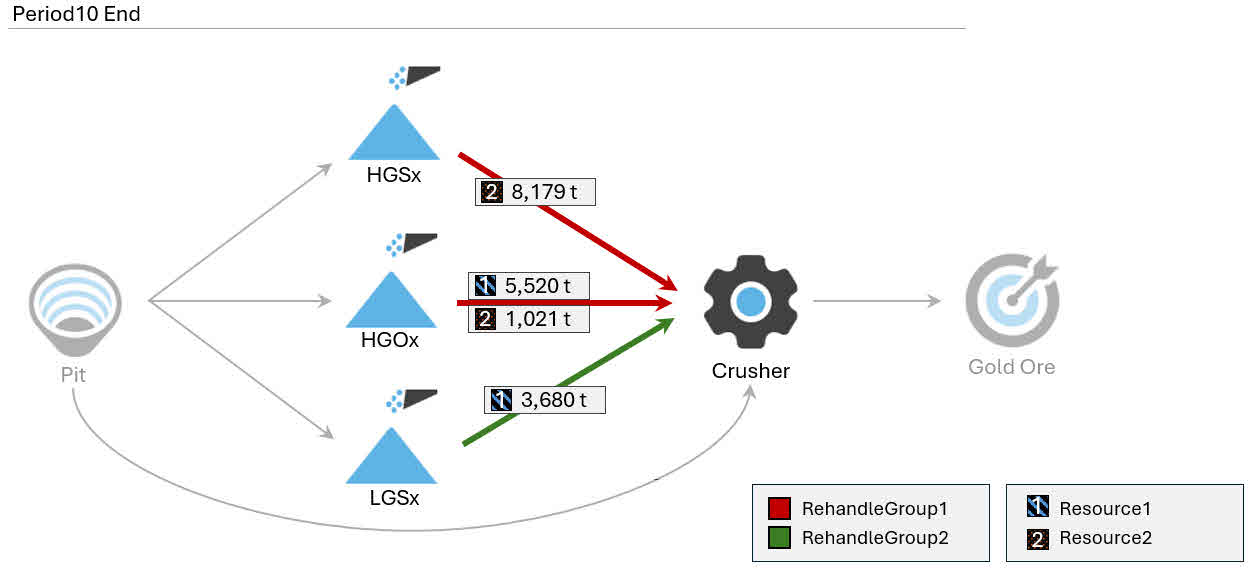
The distribution of resources across stockpiles within a group may vary depending on scheduling logic. This example shows one valid allocation that meets all constraints.
Rehandle production rate
The production rate of a rehandle resource is set in System Config > Resources.
Rehandle capacity (unlimited or limited)
Each rehandle group can have an unlimited or limited capacity.
Limited capacity
When enabled, the schedule applies a constraint to each rehandle group that limits how much material can be moved across its movements (arcs) in each period. This limit is calculated based on the combined capabilities of the resources assigned to the group.
For each resource, the system considers:
-
Its rehandle rate (tonnes per hour)
-
The percentage of its time allocated to the group
-
Its available operating hours (based on shift length and time usage fields)
These values are used to calculate how much material each resource can contribute to the group in a given period. The total group capacity is the sum of these contributions. The schedule ensures that the total material moved within the group doesn’t exceed this calculated limit.
Unlimited capacity
No constraints are applied, allowing unrestricted movement across the group’s arcs during scheduling.
If the material moved across the rehandle group exceeds the amount that the resources can handle, the schedule increases the resources’ production rates to accommodate all the material. A schedule warning flags this.
Rehandle group processing logic
-
Resources obey roster breaks and exceptions.
-
Resources try to continue the same task from the end of the previous period into the start of the next to minimise unnecessary movement.
-
Reclaiming from staged stockpiles respects:
-
LIFO order (if applicable)
-
Maximum number of concurrent reclaiming piles
-
Reclaim swapping penalties (start, middle, end of period)
-
-
Rehandle groups don’t enforce:
-
Staged stockpile filling limits
-
Instantaneous reclaim rate limits (only total per period)
-
Rehandle group limitations
-
Arcs can belong to only one rehandle group.
-
Rehandle groups can only include arcs from stockpiles or staged stockpiles.
-
Resources can’t be assigned to both in-pit and rehandle activities in the same period.
Gantt chart visualisation
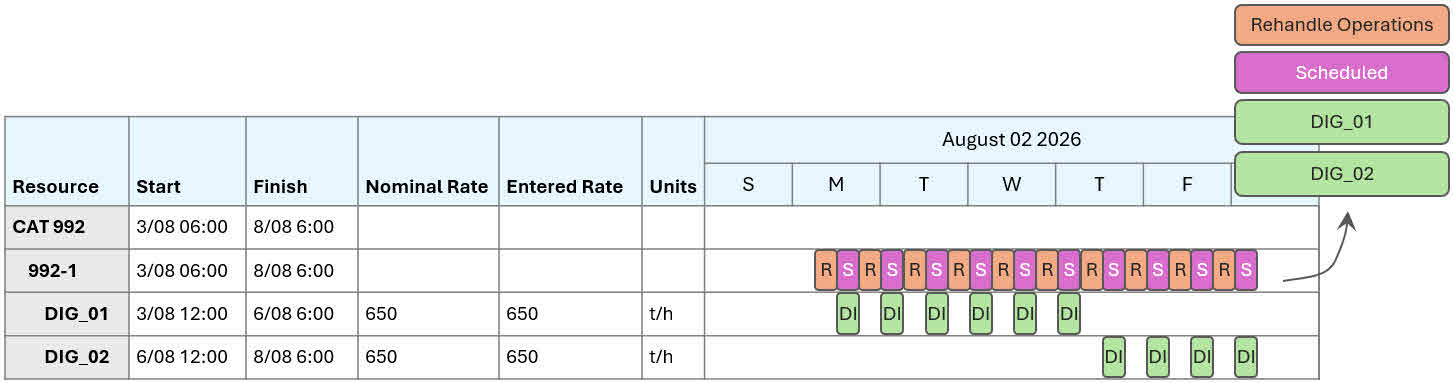
Rehandle resources are displayed on the Gantt chart (see Build schedule using Gantt Chart (Gantt tab)) like any other resource. When these resources perform rehandling tasks, a Rehandle Operation bar is shown to indicate the activity. These rehandling delays are non-adjustable directly on the chart.
You can assign in-pit activities to rehandle resources, provided those resources are permitted to perform such tasks.
Reporting Gantt chart
You can build custom reports (refer to Create pivot tables and charts (Reporting tab)) and Gantt charts (refer to Gantt Reporting tab (Gantt Report tab)) to see the full detail of each material movement assigned to a rehandle group, such as the:
-
Source and destination of each movement
-
Quantities and qualities of materials
-
Rehandle group names and associated tasks
Visualise multiple operations
Custom Gantt charts can integrate rehandle tasks with other operational schedules, such as in-pit mining, plant maintenance, and train logistics. This unified view helps identify dependencies and optimise coordination across different activities.
For example, a custom Gantt chart could display:
-
The sequence of rehandle tasks across each period
-
Locations (e.g., stockpiles) as primary visual elements
-
Resources such as fixed plant, mobile equipment, and other machinery
-
Interdependencies between schedules (e.g., how plant maintenance affects train operations, train allocations to specific stockpiles)
-
Live and dead stockpile locations
For staged stockpiles, the report can display detailed build sequences, including stacking and reclaiming start and finish times. These tasks provide a complete picture of stockpile activity alongside rehandling operations.